Some Basics
There is Wifi in the apartment. We will send you the log-in information.
The apartment is small. We have some tips and tricks so it doesn't feel quite so small!
The cleaners keep a bulky vacuum with a long hose in the (TINY) laundry room. We put it under the bed while we're there so that we can get in and out of the laundry room easier. Just be sure to put it back in the laundry room at the end of your trip so they can find it.
We also move the kitchen table and chairs back a little bit to make more space in the kitchen area, and we keep any dirty clothes that need to be washed in the basket in the laundry room.

If you need extra sheets, they're under the chaise section of the couch and extra blankets are in the closet above the bed.

We have a washer, but no dryer. However, your clothes will dry very fast in the sun. If I do a load of laundry in the morning, it usually dries in about 2 hours.
To operate the washing machine:
Open the lid and you’ll see this gray metal “thing.” Push the black button to open it. This is where you put the clothes. It fits a fair amount of clothes, but don’t overload it. Add your laundry detergent directly to the washer. Close the grey metal thing.


In addition to hanging clothes on the lines on the balcony, there is a dryer rack in the closet that you can hang on the edge of the couch.

Vacuum hose


- Turn the big knob on the left to the cycle you want.
- Pick the temperature (temp.).
- Push the RAPIDE button if you don’t want it to take several hours.
- Press the Départ button.
The washer can take a long time unless you pick one of the faster cycles and push the “rapide” button.
We generally use these cycles:
- 30@30 - 30 minutes, cold water
- Délicat (and then push the rapide button) - 45 minutes
- Coton (plus rapide button) - 2 hours

In the summer, the air conditioner should be on when you arrive. If it isn't, here is how to turn it on or up. There is heat as well, although we have never had to use it, even in the winter.
- Tap the SNOWFLAKE icon. (For the heat, tap the SUN button.)
NOTE: If the snowflake icon is not on the screen and there is a STOP sign instead, hit the STOP sign first. Then swipe the icons in the center of the screen until you come to the SNOWFLAKE. Click on that.


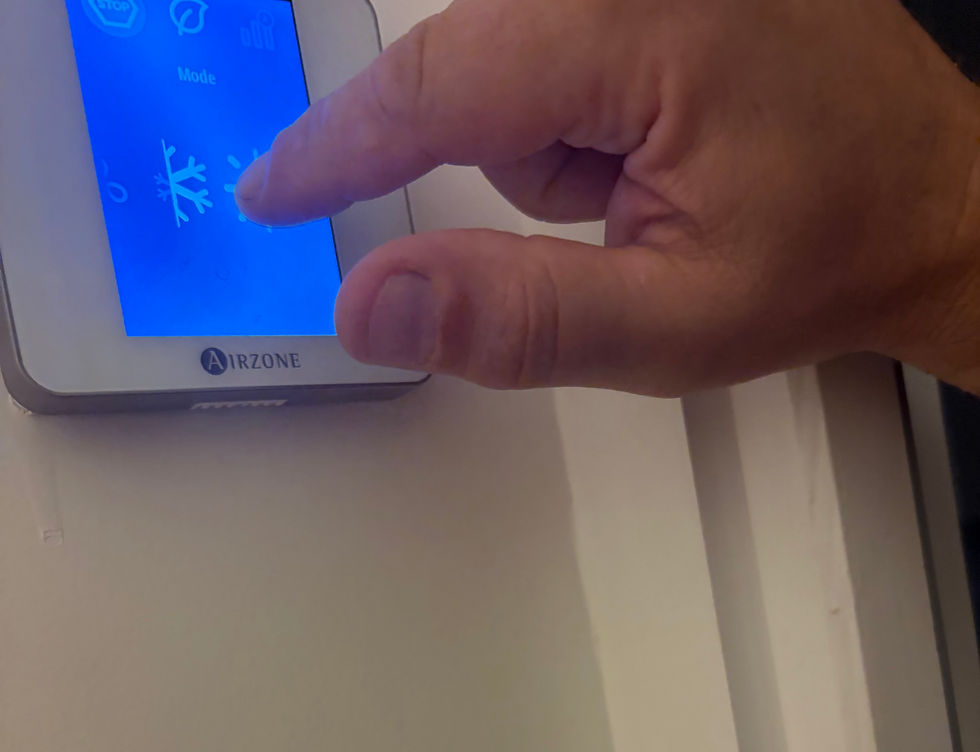
- When you tap the snowflake button in the center screen, it will then appear at the top of the screen and the room temperature will appear in the center.
- Tap on the minus to lower the temperature (make the room cooler) or the plus to increase the temperature (make the room warmer).

19 degrees Celsius is equal to 66 F.
20 degrees Celsius is equal to 68 F.
To use the oven/range:
We have an induction stove which will only heat up if there is an induction pot or pan on it. Other than that, it is like a standard stove.
Trash:
Please bring any trash to the bins at the end of your stay. There are bins in the street below, near the beach parking, and in the parking lot (Parking Wilson) behind the Gare Maritime.
They separate their trash by:
- garbage (non-recyclable stuff/usually grey or black unmarked bins)
- plastic/metal/cardboard/aerosol containers and wrapping (emballages/yellow)
- glass (verre/green)
- paper (paper/blue)
The bins look something like this... (I don't have a picture of the ones closest to the apartment.)
